

Payroll-FAQs and Latest News
Frequently Asked Questions
Last updated January 2025
New employees\Re-joiners* are required to complete 2 important steps BEFORE the Payroll Cut Off (Click on link for info on Payroll Cut Off Dates):
1-Sign and return your contract of employment to the HR General Office by email to askdcupeople@dcu.ie or post to Human Resources Department, MacCormac Building, DCU Glasnevin Campus, Dublin 9.
2-Complete the EDPF (Employee Details Payment Form). This is an online form requiring payroll and pension information. It can only be completed when the employee receives a contract pack from HR. Your contract pack will include steps on how to complete and submit the EDPF (Orange sheet in contract pack). When the EDPF form is successfully submitted you will receive a confirmation email.
*NOTE TO REJOINERS: Once there is a break in service, regardless of the duration of break or even if there has been no change in personal details, re-joiners are required to complete both steps before the Payroll Cut Off in order to be rejoined to Payroll. *When completing the EDPF there is a re-joiner form for current year re-joiners which takes less than a minute to complete.
Please click on link for detailed information on pay dates for each pay group.
All payments are processed in Euro currency and transferred electronically via SEPA (Single Euro Payments Area) directly into recipient's bank accounts.
SEPA transfers offer a secure and reliable method of payment. Click on Information guide to SEPA (revenue.ie) for a list of countries in SEPA zone.
Once you have been paid you can access your payslip online by logging on to Core portal by clicking this link . Upon log on, click Employee dashboard and payment tab to view payslips, current tax details, edit your bank details and view any other relevant payroll documents. You will need your staff DCU network username and password to log on to Core portal, this is available from the DCU Digital Technology Solutions team. Click on link for contact details. For more information on Core Portal & understanding your payslip click here.
All queries should be directed by email to the Payroll team to our central email address payroll@dcu.ie where we adhere to answer all queries as quickly as possible. Please ensure your confirm your Staff Number or PPSN on any correspondence to save further delays in replying and if you need to speak directly to one of the Payroll team, click on link for Payroll Contact details.
The Payroll Office is located within the Finance Department, on the 1st Floor of the Albert College Building, click on link for more information.
There are 3 options listed below for forms to be either processed\completed
1-Email the original form to payroll@dcu.ie, confirming staff number and contact details and the payroll team will revert as quickly as possible to make arrangements to collect the completed form
2-Leave the Payroll Documents (DCU Forms, Salary Certs, DSP forms) in the Finance Office drop off box which is located in the Albert College Building reception area (via entrance to the 1838 Restaurant). This drop off box is checked twice daily by Payroll staff. If you are leaving a form for completion, please ensure you attach a note with your contact details and Payroll will revert as quickly as possible to make arrangements to collect the completed form.
3-Send it via internal post to Payroll Office, DCU Glasnevin Campus. Please note this option may delay the turnaround time of processing the form depending on when the form is received.
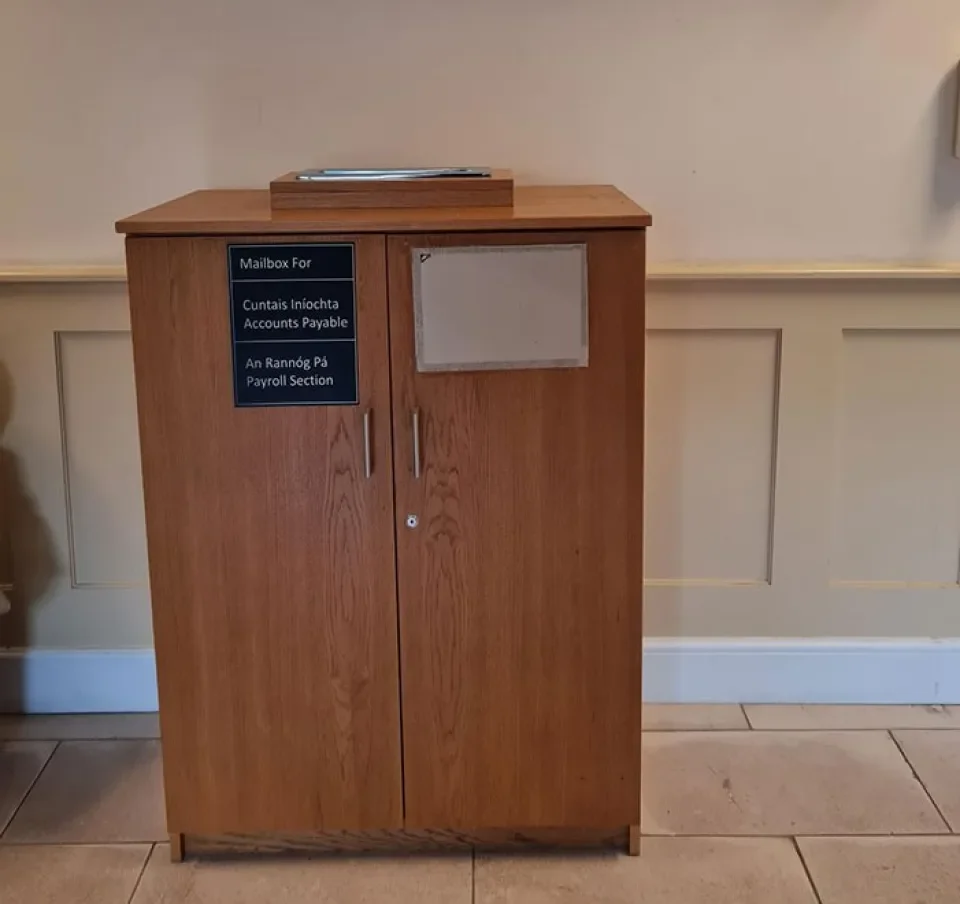
Payroll Drop Box
You must update the details yourself on the on-line Coreportal which will update directly on Core. See step-by-step guide of how to update your bank details. NOTE any changes submitted after payroll cut off (click on link for more information) will not be updated until the next available pay run.
Upon joining DCU, you are automatically included as a member of the DCU Pension (Superannuation) Scheme as outlined in your contract of employment and this means your salary is subject to 2 deductions which are Pension and Additional Superannuation Contribution. For more information on the DCU Pension Schemes, please click on link (DCU username and password required)
Please click on link and select 2nd option on dropdown menu-ASC-Additional Superannuation Contribution for more information
Additional Superannuation Contribtuion is calculated on your pensionable public sector income only from 01st January in the current year. If you have not worked in the Public Sector prior to DCU, your salary will only be subject to ASC when your income has exceeded the Year to Date thresholds. If you have worked in the public sector in a pensionable capacity prior to joining DCU, you should submit your ASC45 to the Payroll office (payroll@dcu.ie) and the Payroll team will reconcile your deductions in the next available payrun. NOTE there are different rates for ASC dependent on what pension scheme category you fall into.
2023 Rates and Thresholds
| Standard Accrual Group | Single Scheme Group |
| First €34,500 @ 0% | First €34,500 @ 0% |
|
Next €25,500 @ 10% |
Next €25,500 @ 3.33% |
| Balance @ 10.5% | Balance @ 3.5% |
If you are leaving DCU, not intending to return to work in the public sector in the near future and have less than 2 years service in the DCU Pension Scheme and you wish to opt for a refund of your contributions, you must apply in writing to the DCU Pensions Section within HR. Email your directive for refund directly to is pensions@dcu.ie or elaine.mcguirk@dcu.ie When you do this, pensions will review your application and pass to payroll for processing if all the criteria is met, payroll will process the payment in the next available payment run. Please note that the Pension value of the refund is subject to 20% Superannuation Tax and any ASC Refund is subject to the employee's standard rate of tax at point of payment.
The 3 deductions are all part of the one scheme, therefore if you decide to remain in the scheme, the 3 deductions will apply. Please click on link below for full details of cover (DCU Username and Password required)
Yes, you can opt out by completing the "Opt Out Form" that was issued with in your contract pack from HR and returning this form to HR Reception desk who will notify payroll. If you opt out within 90 days from the start date of deductions from your salary, the deductions will be refunded in the next salary payment . If you opt out after the 90 day period, deductions will cease in the next salary payment run and no refund will be processed.
No, once you opt out you will not be added back in to the scheme upon contract renewal or re-joining DCU. You can only rejoin the scheme upon completing a detailed application form and medical examination (For further information, please contact HR directly).
PAYE stands for ‘Pay As You Earn’. If you are an employee, you normally pay tax through the PAYE system.
Every time your salary is paid, your employer deducts the following statutory deductions when applicable, Income Tax (IT), Pay Related Social Insurance (PRSI) and Universal Social Charge (USC) and pays the amount deducted to Revenue at the end of the month you have been paid in. PAYE ensures that the yearly amounts you have to pay are collected evenly on each pay day over the course of the tax year.
Your employer deducts Tax based on the tax credits and standard rate cut off point communicated by Revenue upon registration of employment.
You may be entitled to additional tax credits and to tax reliefs and exemptions to reduce the amount of tax you pay.
If you are a PAYE customer, please see how to review your tax for any of the four previous tax years.
USC stands for 'Universal Social Charge'
USC is a tax payable on your total income. Total income for USC purposes includes things such as:
- employment income
- taxable employer benefits
- self-employed income
- rental income
- share option gains
- dividend income.
You do not pay USC on:
- payments from the Department of Social Protection (DSP).
- deposit interest that was subjected to Deposit Interest Retention Tax.
Your employer deducts USC based on the USC threshold rates communicated by Revenue upon registration of employment.
There is no relief from USC for employee pension contributions.
If your total income exceeds €13,000 you pay USC on your full income.
Click here for steps to follow if this is your first employment in Ireland
See Details for DCU, DCU Commercial DAC and DCU Educational Trust listed below
- DCU Staff registered number: 4102060U
- DCU Retiree's registered number: 3448846NH
- Campus Companies registered number: 6542389J under holding Company of DCU Educational Support Services DAC.
- DCU Educational Trust: 4770886G
Once you submit your PPSN to the DCU payroll team when completing bank details etc, they can request a Revenue Payment Notification (RPN) from Revenue in order to avoid Emergency tax being applied, this will be done electronically between DCU payroll and Revenue and a copy of the RPN should be sent to the employees online Revenue account. DCU payroll can only apply what Revenue send through, if you are employed elsewhere at the time DCU request an RPN it may result in a nil cert being issued due to overlapping appointments and in this case we would advise you contact your local Revenue office to resolve the matter.
Every employee is entitled to Tax Credits and SRCOP (Standard Rate Cut off Point), which are issued by Revenue on the basis of their own personal circumstances. If you are employed by more than one employer, you can arrange to have your Tax Credits & SRCOP split between your employments in a manner that will make best use of your entitlements. You can manage this via MyAccount, by registering each employer on the jobs and pensions page (Under PAYE Services), outlining your expected earnings from each employment. You should also be in a position to quote the Employers Registered Number (See DCU EMPLOYER REGISTRATION NUMBERS) of each place of employment. Revenue will split your entitlements between your places of employment, notify your employers of same via electronic communication you can logon directly via myAccount to see split.
You will be issued with an ASC45 (where applicable). P45's were abolished wef 01st January 2019 in line with PAYE Modernisation, your left date is communicated electronically via a submission report from the employer to Revenue following your final payment.
An ASC45 is only issued to employees liable for Additional Superannuation Contribution and is issued to the employee on cessation of employment detailing Gross ASCable Pay and ASC deducted from start of year (01st January) to date of leaving.
Once you receive your final payment from DCU, you can complete a Form P50 - First Claim for Repayment During Unemployment and submit this to your local Tax Office or if you are registered online with Revenue via myAccount you can apply online by logging on via this link. Revenue will refund you directly any Tax or Universal Social Charge Refund that may be due for the tax year you are making the claim for. Please note Revenue have outlined that this process can take from 4/6 weeks to complete.
It is not possible to include staff that join or re-join the University after the Payroll Cut Off within that month’s pay run due to volume of payroll input and strict bank deadlines. Payment will be made the following month assuming all the appropriate paper work is in place i.e. employee contact signed and returned to HR and EDPF (online) form has been submitted
Yes, a full time\fixed hours employee can access Coreportal for up to 6 weeks from their left date, a Part time Casual employee can access Coreportal for up to 12 weeks from their left date. If the enquiry falls outside this period you must email payroll@dcu.ie, quoting your staff number and the payslips that you require and the Payroll team will send on copies as soon as its possible to do so.
From 2019 tax year onwards, your employer is no longer required to provide you with a P60 since the introduction of PAYE Modernisation. This information is now available in the Employment Detail Summary section in myAccount. If you do you have an online Revenue account you may request on through your local Revenue office via this link, however Revenue have outlined it can take up to 6 weeks for them to process this request.
Staff working from home on a full or part-time basis can qualify for tax relief as long as it is supported by receipts.
Work related expenses eligible for tax relief include heating, electricity and broadband expenses.
The allowance or rebate claimed must be reasonable, allowing for the fact that the utilities are for both personal and work and benefit everyone else in the home, so the refund received will be based on only a portion of the overall expenses.
Any claims made will need to be supported with evidence in the form of receipts and possibly a *letter from your employer upon request from Revenue.
*HR will provide this letter as needed but it is not required to submit a claim.
More information is available on the Revenue website
Method of claiming e-Working expenses
e-Working expenses can be claimed by completing an Income Tax return at year end for the tax year the claim is valid in.
Click on this link for more information on how to calculate the relief you may be due (Ref paragraph How to calculate eWorking costs)
An individual can complete this form on the Revenue website as follows:
- Sign into myAccount
- Click on ‘Review your tax’ link under PAYE Services
- Select the "Statement of Liability" return for the relevant tax year
- You may see a Preliminary Income Tax result (depending on your tax status) however in order to claim the relief you need to click on the option "Complete your Income Tax Return" (Blue Box)
- Complete the online form as instructed until you come to Section 4, Tax Credits and Relief
- Select Other PAYE Expenses, under description of expenses claimed enter e-worker Tax Relief, under Amount claimed enter the amount of relief you are claiming for the tax year.
- *NOTE As a claim may be selected for future examination, all documentation relating to a claim should be retained for a period of six years from the end of the tax year to which the claim relates.
LATEST NEWS
Last updated October 2024
October 2024
Please find below staff request applications, staff contracts and payroll information for December 2024.
1. Staff Request Applications (SRA)
For new employee contracts or contract extensions relating to the period up to and including 31st December 2024, the Staff Request Application (SRA) must be raised and fully approved (level 5) by Friday 15th November 2024. Approved staff requisitioners and approvers within Schools and Units may access the staff request application system using the following link StaffRequestApplication.
Please note if a Staff Request Application (SRA) is submitted and approved after 15th November 2024, this staff member will not be paid in the December 2024 payroll.
2. New Employee Contracts & Contract Extensions
New employee contracts and contract extensions relating to the period up to and including 31st December 2024, must be signed, and returned by the employee to askdcupeople@dcu.ie by Monday 2nd December 2024. The employee must also complete the online Employee Details Payment Form (EDPF) by this date (EDPF link included in employee contract pack).
Please note if a contract or EDPF is submitted after Monday 02nd December 2024, this staff member will not be paid in the December 2024 payroll.
3. Part Time Hourly Claims Staff
Hourly payroll claims in relation to DCU Part Time staff must be submitted and fully approved on Core Claims Portal CorePortalPTClaims by Monday 2nd December 2024. The Line Manager may approve hours due to be worked by the staff member up to and including 15th December 2024.
Please note if a claim is submitted and approved after Monday 02nd December 2024, this staff member will not be paid in the December 2024 payroll.
4. Payroll Submissions
Payroll submissions such as overtime forms, salary reallocation requests and general payroll requests, must be submitted to payroll@dcu.ie by Monday 2nd December 2024.
Please note payroll submissions submitted after Monday 02nd December 2024, will not be actioned in time for the December 2024 payroll.
5. Payroll Pay Dates December 2024
| Monthly Paid Staff | |
| Payroll Group | Payment Date |
| DCU Monthly Salary Staff | Thursday 19th December 2024 |
| DCU Monthly Part Time Staff | Thursday 19th December 2024 |
| DCU Monthly Retirees | Thursday 19th December 2024 |
| DCU Monthly Educational Support Services and Subsidiary Companies Staff | Thursday 19th December 2024 |
| DCU Monthly Educational Trust Staff | Thursday 19th December 2024 |
| Weekly Paid Staff | ||
| Payroll Group | Payroll Period | Payment Date |
| DCU Weekly Staff | Weeks Ending 6th, 13th & 20th December 2024 | Friday 13th December 2024 |
| Week Ending 27th December 2024 | Friday 27th December 2024 | |
| DCU Weekly Educational Support Services and Subsidiary Companies Staff | Weeks Ending 6th, 13th & 20th December 2024 | Friday 13th December 2024 |
| Week Ending 27th December 2024 | Friday 27th December 2024 |
Note: Payroll for Week Ending 03rd January 2025 will be paid Friday 10th January 2025.
| Other | |
| Payroll Group | Payment Date |
| DCU Monthly Studentship/Scholarship | Thursday 19th December 2024 |
| External Examiners & QAR's | Monday 16th December 2024 |
6. Contacts For Queries
HR related queries should be directed to askdcupeople@dcu.ie
Payroll related queries should be directed to payroll@dcu.ie
November 2023
Please find below staff request applications, staff contracts and payroll information for December 2023.
1. Staff Request Applications (SRA)
For new employee contracts or contract extensions relating to the period up to and including 31st December 2023, the Staff Request Application (SRA) must be processed and approved by Friday 17th November 2023. Approved staff requisitioners and approvers within Schools and Units may access the staff request application system using the following link StaffRequestApplication.
Please note if a Staff Request Application (SRA) is submitted and approved after 17th November 2023, this staff member will not be paid in the December 2023 payroll.
2. New Employee Contracts & Contract Extensions
New employee contracts and contract extensions relating to the period up to and including 31st December 2023, must be signed, and returned by the employee to askhr@dcu.ie by Friday 1st December 2023. The employee must also complete the online Employee Details Payment Form (EDPF) by this date (EDPF link included in employee contract pack).
Please note if a contract or EDPF is submitted after Friday 1ST December 2023, this staff member will not be paid in the December 2023 payroll.
3. Part Time Hourly Claims Staff
Hourly payroll claims in relation to DCU Part Time staff must be submitted and approved on Core Claims Portal CorePortalPTClaims by Friday 1st December 2023. The Line Manager may approve hours due to be worked by the staff member up to and including 15th December 2023.
Please note if a claim is submitted and approved after Friday 1st December 2023, this staff member will not be paid in the December 2023 payroll.
4. Payroll Submissions
Payroll submissions such as overtime forms, salary reallocation requests and general payroll requests, must be submitted to payroll@dcu.ie by Friday 1st December 2023.
Please note payroll submissions submitted after Friday 1ST December 2023, will not be actioned in time for the December 2023 payroll.
5. Payroll Pay Dates December 2023
| Monthly Paid Staff | |
| Payroll Group | Payment Date |
| DCU Monthly Salary Staff | Wednesday 20th December 2023 |
| DCU Monthly Part Time Staff | Wednesday 20th December 2023 |
| DCU Monthly Retirees | Wednesday 20th December 2023 |
| DCU Monthly Educational Support Services and Subsidiary Companies Staff | Wednesday 20th December 2023 |
| DCU Monthly Educational Trust Staff | Wednesday 20th December 2023 |
| Weekly Paid Staff | ||
| Payroll Group | Payroll Period | Payment Date |
| DCU Weekly Staff | Weeks Ending 8th, 15th & 22nd December 2023 | Friday 15th December 2023 |
| Week Ending 29th December 2023 | Friday 29th December 2023 | |
| DCU Weekly Educational Support Services and Subsidiary Companies Staff | Weeks Ending 8th, 15th & 22nd December 2023 | Friday 15th December 2023 |
| Week Ending 29th December 2023 | Friday 29th December 2023 |
*Note: Payroll for Week Ending 5th January 2024 will be paid Friday 12th January 2024.
| Other | |
| Payroll Group | Payment Date |
| DCU Monthly Studentship/Scholarship | Wednesday 20th December 2023 |
| External Examiners & QAR's | Friday 15th December 2023 |
6. Contacts For Queries
HR related queries should be directed to askhr@dcu.ie
Payroll related queries should be directed to payroll@dcu.ie
October 2023
Increase to DCU Salary Scales and DCU Pension payments under Building Momentum Public Sector Pay Agreement 2021-23
A 1.5% or €750 Increase (whichever value is greater) to all applicable DCU Full time and hourly scales has been applied wef 01st October 2023. All applicable DCU Retirees will also receive an increase to their monthly pension payment wef 01st October 2023.
Applicable DCU Weekly paid staff will receive the increase on payment date 13th October 2023.
Applicable DCU Monthly paid staff will receive the increase on their appropriate payment date 27th or 31st October 2023.
Applicable DCU Retirees\Survivor Pension\Children Pension payees will receive the increase on payment date 27th October 2023.
Changes to DCU Salary Scales can be viewed via this link.
January 2023
e-Worker Tax Relief
Staff working from home on a full or part-time basis can qualify for tax relief as long as it is supported by receipts.
Work related expenses eligible for tax relief include heating, electricity and broadband expenses.
The allowance or rebate claimed must be reasonable, allowing for the fact that the utilities are for both personal and work and benefit everyone else in the home, so the refund received will be based on only a portion of the overall expenses.
Any claims made will need to be supported with evidence in the form of receipts and possibly a *letter from your employer upon request from Revenue.
*HR will provide this letter as needed but it is not required to submit a claim.
More information is available on the Revenue website
Method of claiming e-Working expenses
e-Working expenses can be claimed by completing an Income Tax return at year end for the tax year the claim is valid in.
Click on this link for more information on how to calculate the relief you may be due (Ref paragraph 4 How to calculate eWorking costs)
An individual can complete this form on the Revenue website as follows:
- Sign into myAccount
- Click on ‘Review your tax’ link under PAYE Services
- Select the "Statement of Liability" return for the relevant tax year
- You may see a Preliminary Income Tax result (depending on your tax status) however in order to claim the relief you need to click on the option "Complete your Income Tax Return" (Blue Box)
- Complete the online form as instructed until you come to Section 4, Tax Credits and Relief
- Select Other PAYE Expenses, under description of expenses claimed enter e-worker Tax Relief, under Amount claimed enter the amount of relief you are claiming for the tax year.
- *NOTE As a claim may be selected for future examination, all documentation relating to a claim should be retained for a period of six years from the end of the tax year to which the claim relates.
Budget 2023 Changes
All appropriate adjustments in line with Budget 2023 have also been applied see Revenue link for further information.
Increase to Salary Scales
Minimum Wage has increased to 11.30 per hour wef 01st January 2023.
Applicable Weekly paid staff received increase on payment date 13th January 2023,
Applicable Monthly paid staff received increase on payment dates 27th or 31st January 2023.
Changes to Scales can be viewed via this link.
October 2022
Upcoming Payroll Deadlines and Pay Dates for December 2022
*IMPORTANT NOTICE*
The year end Payrolls are approaching and the purpose of this email is to communicate notice of the Payroll Deadlines for December 2022 which will ensure the DCU Payroll team is in a position to pay all staff their monies due in the correct tax year and before Christmas.
NOTE the normal deadlines\cut off's apply for November 2022 payroll click on link for more info on standard monthly deadlines.
I would appreciate it if you could ensure that this notice is forwarded on to any person expecting a payment that may not be on this mailing list e.g. Part-Time staff, Students in receipt of Student\Scholarship payment, External Examiners. It is imperative that these dates are met to enable the Payroll team to meet the Christmas deadlines set by the various banks.
STAFF REQUEST CUT OFF FOR CONTRACTS TO BE ISSUED
FAO Heads of Depts\Line Managers only
All Staff Requests (SRA’s) for new employee contracts and current extensions (covering the period up to and including 31st December 2022 ) must be lodged via SRA https://staffrequest.dcu.ie/ . Only SRA’s at APPROVED status on Friday 18th November will have contracts issued. SRA’s submitted after this date will not be processed until Jan 2023 and will result in non-payment for the employee.
FAO All Employees with new contracts\contract extensions
Employees must sign and return their contracts to askhr@dcu.ie and submit their Employee Details Payment Form (Online form) where applicable, no later than Friday 02nd December. Contracts unsigned and not returned to HR or non completed EDPF forms (where applicable) will result in non-payment for the employee.
FAO Part Time Employees only
Part Time Claims (Core Part Time Claims Application\Bulk\Paper)- All APPROVED claims for hours worked to 15th December must be submitted to Payroll by Friday 02nd December to be paid in same month, any subsequent claims will be processed in January 2023 Payroll.
DECEMBER 2022 PAYROLL PAY DATES
|
Payment Run |
Date in Bank |
|
DCU Monthly Full Time & Fixed Hrs Staff |
Wednesday 21st Dec |
|
DCU Part Time Claims\Lump Sum payments |
Wednesday 21st Dec |
|
DCU Retiree's |
Wednesday 21st Dec |
|
DCU Weekly Payroll |
THREE week’s wages will be paid on Friday 16th Dec. This payment will cover w\e 09th, 16th and 23rd Dec inclusive. A further payment will be paid on Friday 30th covering w\e 30th Dec i.e. the last week of the 2022 tax year. Next pay date will be Friday 13th January 2023 which covers pay for w\e 06th January, which will be week one for the 2023 tax year |
|
DCU Educational Support Services Weekly |
As DCU Weekly Staff Above |
|
DCU Educational Support Services Monthly |
Wednesday 21st Dec |
|
DCU Educational Trust |
Wednesday 21st Dec |
|
External Examiners & QAR's |
Thursday 15th Dec |
|
Student\Scholarship |
Wednesday 21st Dec |
April 2022
Increase to DCU Part time Hourly rates under Building Momentum Public Sector Pay Agreement 2021-22
DCU Payroll received a retrospective sanction to increase Part time Hourly rates from both 01st October 2021 and 01st February 2022. The rate changes were applied in March 2022 payroll and any retrospective arrears for hours paid from 01st October 2021 to 15 February 2022 were paid in the April 2022 payment (Payday 29/04/2022) to bring pay history up to date at the end of April 2022. If checking your pay slip in April 2022 and you notice the narrative "Salary Adjustment" and a value, this relates to your arrears in pay for the period 01/10/21-15/02/22 inclusive. We have listed the applicable Part time scales on the table below outlining old rate prior to increase and the rate changes from both Oct 21 and Feb 22. If you have any queries regarding this, please contact us by email, payroll@dcu.ie
|
Increase to qualifying retirees pensions under Circular 10/21, Part 4 Sectoral Bargaining
DCU HR Pensions Office recently confirmed Circular 10/21 was issued by the Department of Public Expenditure and Reform (DPER) to all public sector employers outlining the pension increase policy until the end of 2022.
Based on a full review by the HR Pensions team, an increase has been applied to all qualifying pensions in line with Part 4 of the circular with arrears backdated to 01st February 2022.
This will be processed in the April payment, pay day 28/04/2022. You can access your payslip, where applicable via Core portal
If you have any queries in relation about qualifying for the increase, please direct them to pensions@dcu.ie and the Pensions team will revert with a reply in due course.
Click on link to view full circular
VHI Premium Waiver Communication
For any employee who is currently paying private health insurance with VHI, there will soon be a premium waiver payment returned to the main policy holder. This is subject to certain criteria, there is no action required by the individual, VHI will contact the policy holder directly and also pay the relevant refund directly to the policy holders bank account on file.
Click on link to view full press release details.
March 2022
Increase to DCU Salary Scales due to Sectoral Bargaining under Building Momentum Public Sector Pay Agreement 2021-22
A 1% Increase to all applicable DCU Full time and hourly scales has been applied wef 01st February 2022.
Applicable DCU Weekly paid staff received the increase and arrears to 01st February on payment date 11th March 2022,
Applicable DCU Monthly paid staff received the increase and arrears to 01st February or thereafter on payment dates 28th or 31st March 2022.
Changes to Scales can be viewed via this link.
January 2022
e-Worker Tax Relief
Staff working from home on a full or part-time basis can qualify for tax relief as long as it is supported by receipts.
Work related expenses eligible for tax relief include heating, electricity and broadband expenses.
The allowance or rebate claimed must be reasonable, allowing for the fact that the utilities are for both personal and work and benefit everyone else in the home, so the refund received will be based on only a portion of the overall expenses.
Any claims made will need to be supported with evidence in the form of receipts and possibly a *letter from your employer upon request from Revenue.
*HR will provide this letter as needed but it is not required to submit a claim.
More information is available on the Revenue website
Method of claiming e-Working expenses
e-Working expenses can be claimed by completing an Income Tax return at year end for the tax year the claim is valid in.
Click on this link for more information on how to calculate the relief you may be due (Ref paragraph 4 How to calculate eWorking costs)
An individual can complete this form on the Revenue website as follows:
- Sign into myAccount
-
Click on ‘Review your tax’ link under PAYE Services
- Select the "Statement of Liability" return for the relevant tax year
- You may see a Preliminary Income Tax result (depending on your tax status) however in order to claim the relief you need to click on the option "Complete your Income Tax Return" (Blue Box)
- Complete the online form as instructed until you come to Section 4, Tax Credits and Relief
- Select Other PAYE Expenses, under description of expenses claimed enter e-worker Tax Relief, under Amount claimed enter the amount of relief you are claiming for the tax year.
- *NOTE As a claim may be selected for future examination, all documentation relating to a claim should be retained for a period of six years from the end of the tax year to which the claim relates.
Budget 2022 Changes
All appropriate adjustments in line with Budget 2022 have also been applied see Revenue link for further information.
Increase to Salary Scales
Minimum Wage has increased to 10.50 per hour wef 01st January 2022.
Applicable Weekly paid staff received increase on payment date 14th January 2022,
Applicable Monthly paid staff received increase on payment dates 28th or 31st January 2022.
Changes to Scales can be viewed via this link.
December 2021
Increase to Retirees\Spouses\Children's Pension
DCU HR Pensions Office have confirmed Circular 10/21 was issued to all public sector employers outlining the pension increase policy until the end of 2022.
Based on a full review by the HR Pensions team, an increase has been applied to all qualifying pensions in line with the rules of the circular with arrears backdated to July 2021 and Oct 2021. This will be processed in the December payment, pay day 20/12/2021. You can access your payslip via Coreportal by clicking on this link.
If you have any queries in relation about qualifying for the increase, please direct them to pensions@dcu.ie and the Pensions team will revert in due course.
Click on link to view full circular
November 2021
Upcoming Payroll Deadlines and Pay Dates for December 2021
Please take the time to review any relevant information to ensure the necessary paperwork is submitted by the highlighted cut off date as this will enable the Payroll team to complete all payment runs to meet the strict bank deadlines in advance of the Christmas closure. The Payroll team will be not in a position to process any payments outside the dates listed below in line with current Revenue regulations so if employees are not paid in December, the next available pay date will be the end of January 2022.
Where applicable, I would appreciate it if you could ensure that this notice is brought to the attention of any staff member that may not be on this mailing list e.g. Part-Time staff, Post Grads in receipt of Studentship payment and External Examiners.
FAO Heads of Depts\Admins only
All Staff Requests (SRA’s) for new employee contracts and current extensions (covering the period up to and including 31st December 2021 ) must be lodged via SRA https://staffrequest.dcu.ie/ . Only SRA’s at APPROVED status on Thursday 18th November will have contracts issued. SRA’s submitted after this date will not be processed until Jan 2022 and will result in non-payment for the employee in December 2021.
FAO All Employees with new contracts\contract extensions
Employees must sign and return their contracts to askhr@dcu.ie and submit their Employee Details Payment Form (Online form) where applicable, no later than Thursday 02nd December. Contracts unsigned and not returned to HR or non completed EDPF forms (where applicable) will result in non-payment for the employee.
FAO Part Time Employees only
·Part Time Claims (Paper\Bulk\Core Part Time Claims Application\CAA*)- All APPROVED claims for hours worked to 15th December must be submitted to Payroll by Thursday 02nd December to be paid in same month, any subsequent claims will be processed in January 2022 Payroll.
*CAA Claimants can claim for Hours worked up to 15th December via CAA portal between 18th November and 02nd December. NOTE only claims at PENDING PAYROLL status received by 02/12 will be paid in December.
DECEMBER 2021 PAYROLL PAY DATES
|
Pay Run |
Date in Bank |
|
DCU Monthly Full Time & Fixed Hrs Staff |
Monday 20th Dec |
|
DCU Part Time Claims\Lump Sum payments |
Monday 20th Dec |
|
DCU Retiree's |
Monday 20th Dec |
|
DCU Weekly Payroll |
THREE week’s wages will be paid on Friday 17th Dec. This payment will cover w\e 10th, 17th and 24th Dec inclusive. A further payment will be made on Friday 31st covering w\e 31st Dec i.e. the last week of the 2021 tax year. Next pay date will be Friday 14th January 2022 which covers pay for w\e 07th January, which will be week one for the 2022 tax year |
|
DCU Commercial Weekly |
As per DCU Weekly Staff Above |
|
DCU Commercial Monthly |
Monday 20th Dec |
|
DCU Educational Trust |
Monday 20th Dec |
|
External Examiners, Accreditors & QAR's |
Wednesday 15th Dec |
|
Studentship |
Monday 20th Dec |
NOTE normal deadlines\cut off's apply for November 2021 payroll click on link for more info on standard monthly deadlines.
January 2021
e-Worker Tax Relief
Staff working from home on a full or part-time basis can qualify for tax relief as long as it is supported by receipts.
Work related expenses eligible for tax relief include heating, electricity and broadband expenses.
The allowance or rebate claimed must be reasonable, allowing for the fact that the utilities are for both personal and work and benefit everyone else in the home, so the refund received will be based on only a portion of the overall expenses.
Any claims made will need to be supported with evidence in the form of receipts and possibly a *letter from your employer upon request from Revenue.
*HR will provide this letter as needed but it is not required to submit a claim.
More information is available on the Revenue website
Method of claiming e-Working expenses
e-Working expenses can be claimed by completing an Income Tax return at year end for the tax year the claim is valid in.
Click on this link for more information on how to calculate the relief you may be due (Ref paragraph How to calculate eWorking costs)
An individual can complete this form on the Revenue website as follows:
- Sign into myAccount
- Click on ‘Review your tax’ link under PAYE Services
- Select the "Statement of Liability" return for the relevant tax year
- You may see a Preliminary Income Tax result (depending on your tax status) however in order to claim the relief you need to click on the option "Complete your Income Tax Return" (Blue Box)
- Complete the online form as instructed until you come to Section 4, Tax Credits and Relief
- Select Other PAYE Expenses, under description of expenses claimed enter e-worker Tax Relief, under Amount claimed enter the amount of relief you are claiming for the tax year.
- *NOTE As a claim may be selected for future examination, all documentation relating to a claim should be retained for a period of six years from the end of the tax year to which the claim relates.
Budget 2021 Changes
All appropriate adjustments in line with Budget 2021 have also been applied see Revenue link for further information.
Increase to Salary Scales
Minimum Wage has increased to 10.20 per hour wef 01st January 2021, Applicable Weekly paid staff received increase on payment date 08th January 2021, Applicable Monthly paid staff received increase on payment date 28th January 2021.
Changes to Scales can be view via this link.
November 2020
Year End Payrolls
All staff were emailed on 21st October, follow up reminders sent 02nd, 12th and 26th November
The year end Payrolls are approaching and the purpose of this email is to communicate notice of the Payroll Deadlines for December 2020 which will ensure the DCU Payroll team is in a position to pay all staff their monies due in the correct tax year and before Christmas. NOTE normal deadlines\cut off's apply for November 2020 payroll click on link for more info on standard monthly deadlines.
I would appreciate it if you could ensure that this notice is brought to the attention of any staff member that may not be on this mailing list e.g. Part-Time staff, Post Grads in receipt of Studentships, External Examiners. It is imperative that these dates are met to enable the Payroll team to meet the Christmas deadlines set by the various banks.
Listed below are the schedules for all staff in December 2020.
DECEMBER PAYROLL DEADLINES
FAO Heads of Depts\Admins only
- All Staff Requests (SRA’s) for new employee contracts and current extensions (covering the period up to and including 1st January 2021 ) must be lodged via SRA https://staffrequest.dcu.ie/ . Only SRA’s at APPROVED status on Monday 16th November will have contracts issued. SRA’s submitted after this date will not be processed until Jan 2021 and will result in non-payment for the employee.
FAO All Employees with new contracts\contract extensions
·Employees must sign and return their contracts to askhr@dcu.ie and submit their Employee Details Payment Form (Online form) where applicable, no later than Monday 30th November. Contracts unsigned and not returned to HR will result in non-payment for the employee.
FAO Part Time Employees only
·Part Time Claims (Paper\Bulk\CAA*)-Hours can be claimed up to Tuesday 15th December, (subject to approval of School\Dept). All APPROVED claims must be submitted to Payroll by Monday 30th November to be processed in December, any subsequent claims will be processed in January 2021 Payroll.
*CAA Claimants can claim for Hours up to 15th December (subject to approval of School\Dept) via https://claimsapproval.dcu.ie/ between 18th and 30th November. NOTE only claims at PENDING PAYROLL status received by 30/11 will be paid in December.
DECEMBER 2020 PAYROLL PAY DATES
|
Pay Run |
Date in Bank |
|
DCU Monthly Full Time & Fixed Hrs Staff |
Monday 21st Dec |
|
DCU Part Time Claims\Lump Sum payments |
Monday 21st Dec |
|
DCU Retiree's |
Monday 21st Dec
|
|
DCU Weekly Payroll |
THREE week’s wages will be paid on Friday 11th Dec. This payment will cover w\e 04th, 11th and 18th Dec inclusive, A further payment will be made on Thursday 31st covering w\e 25th Dec i.e. the last week of the 2020 tax year. Next pay date will be Friday 08th Jan 2021 which covers pay for w\e 01st Jan, which will be week one for the 2021 tax year |
|
DCU Commercial DAC Weekly |
As DCU Weekly Staff Above |
|
DCU Commercial DAC Monthly |
Monday 21st Dec
|
|
Educational Trust |
Monday 21st Dec |
|
External Examiners & QAR's |
Tuesday 15th Dec |
|
Postgraduate |
Monday 21st Dec |
Public Service Stability Agreement 2013-2020 (Haddington Road Agreement/Lansdowne Road Agreement)
DCU Payroll has received the sanction to proceed with payment of a 2% increase wef 01st October under the current agreement.
All applicable weekly paid salaries\allowance will receive increase on Friday 16th October for payment of a full week to 09th October and 2 days arrears for 01st/2nd October
All applicable monthly paid salaries\allowance will receive increase on Wednesday 28th October for their October 2020 salary.
All applicable Retirees will receive increase on Wednesday 28th October for their October 2020 pension payment.
Changes to the scales are available to view under this link
April 2020
e-Worker Tax Relief
Staff working from home on a full or part-time basis can qualify for tax relief as long as it is supported by receipts and a letter of confirmation from your employer*.
*Letter only applicable if requested by Revenue, you do not need this to submit a claim
Staff who have been asked to work from home as a result of the outbreak of Covid-19 can avail of Revenue's e-worker tax relief.
Work related expenses eligible for tax relief include heating, electricity and perhaps broadband expenses.
The allowance or rebate claimed must be reasonable, allowing for the fact that the utilities are for both personal and work and benefit everyone else in the home, so the refund received will be based on only a portion of the overall expenses.
Any claims made will need to be supported with evidence in the form of receipts and possibly a letter from your employer upon request from Revenue. HR will provide this letter as needed but it is not required to submit a claim.
More information is available on the Revenue website
Method of claiming e-Working expenses
e-Working expenses can be claimed by completing an Income Tax return at year end for the tax year the claim is valid in.
Click on this link for more information on how to calculate the relief you may be due (Ref paragraph 2.4)
An individual can complete this form on the Revenue website as follows:
- Sign into myAccount
- Click on ‘Review your tax’ link under PAYE Services
- Select the Income Tax return for the relevant tax year
- Complete the Form 12 online form as instructed until you come to Section 4, Tax Credits and Relief
- Select Other PAYE Expenses, under description of expenses claimed enter e-worker Tax Relief, under Amount claimed enter the amount of relief you are claiming for the tax year.
- *NOTE As a claim may be selected for future examination, all documentation relating to a claim should be retained for a period of six years from the end of the tax year to which the claim relates.
January 2020
Employment Detail Summary (Previously P60 document)
From 2019 tax year onwards since the introduction of PAYE Modernisation, your employer is no longer required to provide you with a P60. This information is now available in your Employment Detail Summary in myAccount. If you do you have an online Revenue account you may request on through your local Revenue office via this link, however Revenue have outlined it can take up to 6 weeks for them to process this request.
Additional Superannuation Changes (ASC)
Applicable to DCU Staff only and deduction is subject to Pensionable Renumeration
There are two sets of thresholds and rates applicable to DCU Staff
i) Single Public Service Pension Scheme (Single Scheme) in general new entrants on or after 1st January 2013 and
ii) Standard Accrual members of Pre 2013 Public Service Pension Schemes (pre-existing schemes). Rates for 2020 below
|
Single Scheme Rates 2020 |
Standard Accrual Rates 2020 |
|
First €34,500 @ 0% |
First €34,500 @ 0% |
|
Next €25,500 @ 3.33% |
Next €25,500 @ 10.00% |
|
Balance @ 3.5% |
Balance @ 10.50% |
Budget 2020 Changes
All appropriate adjustment in line with Budget 2020 has also been applied see Revenue link for further information.
Increase to Salary Scales
Public Service Stability Agreement 2018-2020 – In line with this agreement all salary scales up to €32,000 have had an increase of 0.5% applied, Applicable DCU Weekly staff received increase with 2 days arrears on payment date 17th January 2020, Applicable DCU Monthly staff received increase on payment date 28th January 2020.
Changes to Scales can be view via this link.
January 2019
PAYE Year End 2018 P60 Documentation
Under the new Payroll Modernisation regulations this is the last year staff will receive a P60. We ask staff to be patient with us at this extremely busy period. We are currently working on the 2018 year end and as per Revenue regulations P60 will be made available on or before the 15th February 2019.
An all staff email will be issued once they are available.
2019 Payslips update
Changes for the 2019 PAYE tax year.
1) Payroll Modernisation - see Revenue link for further information
DCU has applied all the Revenue Payroll Notifications RPN (Old P2C Tax cert information) when calculating your pay. It would be advisable for each employee to check their payslip to ensure the correct Tax Credits, Cut Off and Local Property Tax (if applicable) has been applied. If there are any adjustments /queries to be made you must deal directly with Revenue via your myAccount or by phone. DCU can only work on the information provided by Revenue. Prior to each pay run we will be retrieving any adjustments applied by Revenue electronically.
2) Applicable to DCU Staff only - PRD (Pension Related Deduction) has been replaced by ASC (Added Superannuation Contributions). See Dept. of Education & Skills circular 0084/2018 at this link
Two main changes are:
a) It is now only deductible on Pensionable remuneration
b) There are two sets of thresholds and rates applicable to DCU Staff
i) Single Public Service Pension Scheme (Single Scheme) in general new entrants on or after 1st January 2013 and
ii) Standard Accrual members of Pre 2013 Public Service Pension Schemes (pre-existing schemes). Rates for 2019 below
|
Single Scheme Rates 2019 |
Standard Accrual Rates 2019 |
|
First €32,000 @ 0% |
First €32,000 @ 0% |
|
Next €28,000 @ 6.66% |
Next €28,000 @ 10.00% |
|
Balance @ 7% |
Balance @ 10.50% |
3) All appropriate adjustment in line with Budget 2019 has also been applied see Revenue link for further information.
4) Public Service Stability Agreement 2018-2020 – In line with this agreement all salary scales up to €30,000 have had an increase of 1% applied.
The Payroll web site FAQ etc. will be updated over the next week or so to reflect the above
November 2019
Year End Payrolls
All staff email sent 15th October, follow up email 01st November, 13th November and final reminder sent 28th November
*IMPORTANT NOTICE*
The year end Payrolls are approaching and the purpose of this email is to communicate notice of the Payroll Deadlines for December's pay run .
This deadline will ensure we are in a position to pay all staff their monies due in the correct tax year and before the Christmas break.
I would appreciate if you could ensure that this notice is brought to the attention of any staff member that may not be on this mailing list e.g. Part-Time staff, Post Grads in receipt of Studentships, External Examiners.
It is imperative that these dates are met to enable the Payroll team to meet the Christmas bank deadlines.
Listed below are the schedules for all staff in December 2019.
DECEMBER PAYROLL DEADLINES
FAO Heads of Depts\Admins only
- All Staff Requests (SRA’s) for new employee contracts and current extensions (covering the period up to and including 1st January 2020 ) must be lodged via SRA https://staffrequest.dcu.ie/ . Only SRA’s at APPROVED status on Friday 15th November will have contracts issued. SRA’s submitted after this date will not be processed until Jan 2020 and will result in non-payment for the employee.
FAO All Employees with new contracts\contract extensions
- Employees must sign and return their contracts to the HR Reception and submit their Employee Details Payment Form (Online form) where applicable, no later than Friday 29th November 2019. Contracts unsigned and not returned to HR will result in non-payment for the employee.
FAO Part Time Employees only
- Part Time Claims (Paper\Bulk\CAA*)-Hours can be claimed up to Friday 13th December, (subject to approval of School\Dept). All APPROVED claims must be submitted to Payroll by Friday 29th November to be processed in December, any subsequent claims will be processed in January 2020 Payroll.
*CAA Claimants can claim for Hours up to 13th December (subject to approval of School\Dept) via https://claimsapproval.dcu.ie/ between 18th and 29th November. NOTE only claims at PENDING PAYROLL status received by 29/11 will be paid in December.
DECEMBER 2019 PAYROLL PAY DATES
|
Pay Run |
Date in Bank |
|
DCU Monthly Full Time & Fixed Hrs Staff |
Friday 20th Dec |
|
DCU Part Time Claims\Lump Sums |
Friday 20th Dec |
|
DCU Retiree's |
Friday 20th Dec |
|
DCU Weekly Payroll |
THREE week’s wages will be paid on Friday 13th Dec. This payment will cover w\e 06th, 13th and 20th Dec inclusive, A further payment will be made on Friday 27th covering w\e 27th Dec i.e. the last week of the 2019 tax year. Next pay date will be Friday 10th Jan 2020 which covers pay for w\e 03rd Jan, which will be week one for the 2020 tax year |
|
DCUCommercial DAC Weekly |
As DCU Weekly Staff Above |
|
DCUCommercial DAC Monthly |
Friday 20th Dec |
|
Educational Trust |
Friday 20th Dec |
|
External Examiners & QAR's |
Monday 16th Dec |
|
Postgraduate |
Thursday 19th Dec |
September 2019
1.75% Increase
There was an increase of 1.75% to DCU whole time annual basic salary scales wef 01st September 2019 under the Public Sector Stability Agreement 2013-2020 (Haddington Road Agreement/Lansdowne Road Agreement)
Click on this link to view current salary scales wef 01/09/2019
- Allowances linked to salary scales have been reviewed and updated in line with Increase
- Weekly paid employees will receive the first payment on Friday 13th September (covering pay period 01st to 08th September)
- Monthly paid employees will receive the first payment on Friday 27th September (covering pay period 01st to 30th September)
- Any DCU staff on an personal rate (non DCU scale) were reviewed by HR and the increase was only applied to rates approved by HR. If you did not receive the increase and wish to query this, you must get in touch with your relevent contact in HR (click on link for more info) as Payroll will only apply as per HR instruction
- This increase does NOT apply to DCU Commercial DAC or Educational Trust Salary Scales
Full details of the Public Sector Stability Agreement are available via this link
February 2019
2018 Year End Documents
All staff email sent 05th February 2019
Year End Documents: Under statutory regulations staff in employment at 31st December 2018 are due to be supplied with a P60 and PRD60 Certificate (Pension Related Deduction Certificate relates to DCU staff only where applicable).
Staff and retired staff that receive their pay slips currently via Core Portal now have access to these year-end documents, to view/print via their Core Portal page at https://www.dcu.ie/pls/coreportal_live
(If you wish to print a copy of the P60 after viewing please hit Generate P60 at bottom of screen)
For the remaining staff (DCU Part-Time casual) these documents are being put in the internal mail today and will be making their way to the school/department administrator over the next few days. They are in a self-seal format similar to your pay slip, just larger in size.
FAO - Administrative staff responsible for internal mail please ensure that these are forwarded on to staff safely. Should part-time staff not be on the premises in the near future, I would appreciate if you could forward the documents to their home address where available, if you are confident it is their up to date address. If you are unsure of an address please return the documents to the Payroll Office asap.
Retired staff members (Not using Core Portal) – P60’s will be mailed today to the current home address on the system.
Again we remind staff not on Core Portal to please keep all of these documents safely as paper copies cannot be raised at a later date.
Please go to the links below to get a full explanation of the figures on your P60 & PRD60 as they do not always represent your actual gross salary
http://www.dcu.ie/finance/P60.shtml & http://www.dcu.ie/finance/PRD60.shtml
Just to remind staff that the payroll office updates their web page on an ongoing basis see
https://www.dcu.ie/finance/payroll
All payroll queries should be directed to our central email addressPayroll@dcu.ie